More Enhancements to the Document Template
The next step in building this document generation system is to define a few content controls that allow the template designer to write other necessary C# code for the document generation process. As an example, the template designer needs to write code that executes when the document generation process starts, i.e. the code that will go in Main. There is other code the template designer needs to write – details below.
This post is the fourth in a series of blog posts. Here is the complete list: Generating Open XML WordprocessingML Documents Blog Post Series
For this particular approach to building a document generation system, I am planning on the following:
- The document generation process will first process the document template and generate a new C# program.
- After generating the new program, the document generation process will compile the new program, and then run it, which will then generate all documents for this document generation run.
- There are, of course, pros and cons to this approach. I’ll mention some of them as I go along.
The generated code will be a combination of:
- Code to create the Open XML SDK package, and to create an in-memory clone of the template document.
- LINQ to XML code to update the contents of the main document part in the package. I’ll have more to say about this in the next post. I’m going to write a pure functional transformation from am XML tree to C# code to create the tree. The generated code will use functional construction, not a DOM style approach.
- Code extracted from the template document and inserted at appropriate places so that it generates the proper WordprocessingML markup. The code to extract the content of the content controls, and include the content control code in the appropriate places. This will be just a few lines of code.
This sounds more complicated than it is. In upcoming posts, I’ll walk through how the code works in detail. Also, when completed, this example will be super-easy to run. It will be educational to play around with code in the content controls to generate a wide variety of documents.
I have further refined the C# code that the template designer will write inside of content controls. In addition to that refinement, I have added four more content controls where it doesn’t matter where the template designer places them in the document. These content controls contain code that we need to make the process work – they don’t contain code directly associated with generating content.
The Generated Program Structure
Before discussing the code in the various content controls, I want to discuss the structure of the generated program. There will be a class named Generator, which will be generated in the code generation process. This class will have a couple of properties or fields, and will have one method (beyond the constructor). There will one instance of this class for each generated document.
The code in the Value, Table, and Conditional content controls executes in the context of an instance of the Generator class. Therefore, the code can access instance fields and properties.
New Version of the Template Document
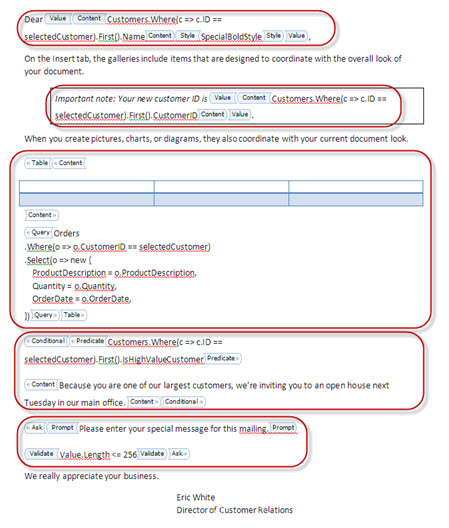
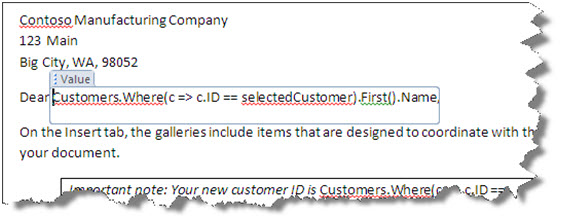
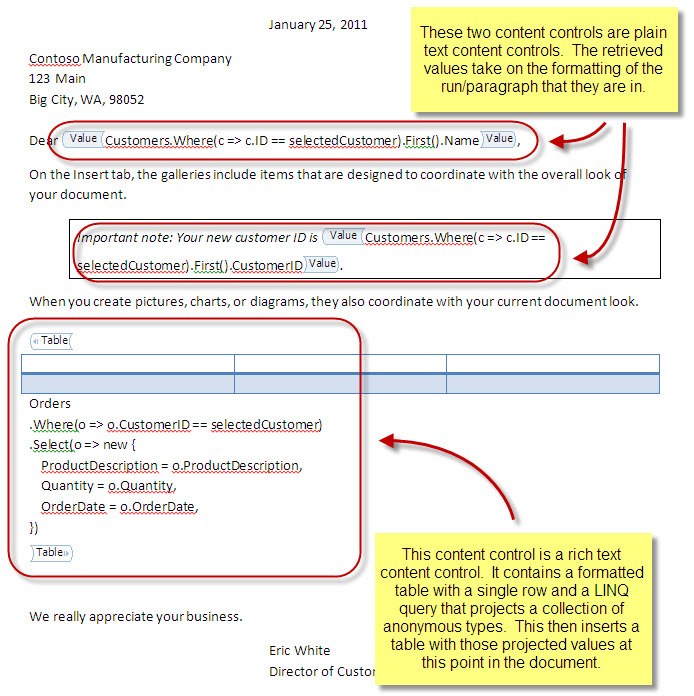
First, I’ll examine the new version of the template document. The titles of the content controls are the same, but the code inside is different from the last post. As before, there are the Value content controls that contain values to be inserted into the document. I agree with feedback that Svetlin provided – the value derived from this content control will use the formatting of the underlying run or paragraph. No need to specify a style.
The following code accesses an instance property of the Generator class. The instance property is Cust.

The Table content control looks about the same as in the last post, except that it is now written to access fields in the Generator object:

Same thing with Conditional – it can access the Cust instance property.

The design of the Ask content control is the same as in the last iteration of this template document:

There are four new content controls in this template that enable the template designer to write the necessary code so that the document generation process can generate a C# program that is complete and can compile:
- Using
- Classes
- GeneratorMembers
- GeneratorMain
The Using content control contains the using statements for the generated program. The generated program may be so simple that it only uses LINQ to XML, as in the example I’m working up. However, it could be more interesting – it might access an OData feed. It might connect to any arbitrary database or web service. It can connect to any data source that you can get to with .NET. Therefore, we need the ability to specify the using statements for the generated program:

The Classes content control enables the template designer to define some classes that contain the data that the program reads from the data source. In this first example, there is a Customer class and an Order class:

The GeneratorMembers content control enables the template designer to specify members of the Generator class. This field contains the customer that a particular Generator object is generating a document for.

Last, but not least, there will be the GeneratorMain content control, which contains the code that will go in the Main method in the generated program:

This GeneratorMain is expecting to read an XML document that looks like this:

And the generated program, after everything is said and done, will look something like this:
using System;

using System.Collections.Generic;

using System.Linq;

using System.Text;

using System.Xml.Linq;
namespace DocumentGenerator
{
class Customer
{
public int CustomerID;
public string Name;
public bool IsHighValueCustomer;
}
class Order
{
public int CustomerID;
public string ProductDescription;
public decimal Quantity;
public DateTime OrderDate;
}
class Generator
{
Customer Cust;
void GenerateDocument()
{
// This method will be automatically generated during the generation process.
// There will be a lot of code in this method.
Console.WriteLine("Generating document for customer {0}", Cust.CustomerID);
}
static void Main(string[] args)
{
XElement data = XElement.Load("Data.xml");
var customers = data
.Elements("Customers")
.Elements("Customer")
.Select(c => new Customer() {
CustomerID = (int)c.Element("CustomerID"),
Name = (string)c.Element("Name"),
IsHighValueCustomer = (bool)c.Element("IsHighValueCustomer"),
});
var orders = data
.Elements("Orders")
.Elements("Order")
.Select(o => new Order() {
CustomerID = (int)o.Element("CustomerID"),
ProductDescription = (string)o.Element("ProductDescription"),
Quantity = (decimal)o.Element("Quantity"),
OrderDate = (DateTime)o.Element("OrderDate"),
});
Generator p = new Generator();
foreach (var customer in customers)
{
p.Cust = customer;
p.GenerateDocument();
}
}
}
}
In the next blog post, I’m going to discuss generating C# code from an XML tree. This code needs to use functional construction, so that the code generation process can insert queries at all appropriate points in the generated code. That is going to be fun code to write!!!