Query Open XML Spreadsheets in VB.NET using LINQ

I’ve put together a screen-cast that shows how to query an Open XML spreadsheet using LINQ from VB.NET.  If you are using VB, this is a super-easy way to extract data from SpreadsheetML.

You can find the code at OpenXMLDeveloper.org.

Shows how to query an Open XML spreadsheet from VB.NET using LINQ

Comments

Introduction to DocumentBuilder 2.0–Screen-Cast 3 of 3

DocumentBuilder 2.0 is a much-improved version of the DocumentBuilder class that is part of PowerTools for Open XML. Using DocumentBuilder, you can split Open XML WordprocessingML documents apart, and merge and combine them in a variety of ways. DocumentBuilder deals with the many issues associated with interrelated markup in Open XML WordprocessingML.

This third screen-cast in this 3 part series explains how DocumentBuilder is data-driven so that it is more robust.

You can find a complete list of DocumentBuilder 2.0 content as well as links to download it in the DocumentBuilder Wiki Page on OpenXMLDeveloper.org.

Before watching this screen-cast, be sure to watch the first in the series and the second in the series.

Explains how DocumentBuilder 2.0 is data-driven, which makes it more robust and reliable.

Comments

Introduction to DocumentBuilder 2.0–Screen-Cast 2 of 3

DocumentBuilder 2.0 is a much-improved version of the DocumentBuilder class that is part of PowerTools for Open XML.  Using DocumentBuilder, you can split Open XML WordprocessingML documents apart, and merge and combine them in a variety of ways.  DocumentBuilder deals with the many issues associated with interrelated markup in Open XML WordprocessingML.

You can find a complete list of DocumentBuilder 2.0 content as well as links to download it in the DocumentBuilder Wiki Page on OpenXMLDeveloper.org.

Before watching this screen-cast, be sure to watch the first in the series.

Shows how to merge document that contain comments that contain images in the comments.

Comments

Screen-Cast Introduction to DocumentBuilder 2.0, and new DocumentBuilder Resource Center

I’ve put together the first of three screen-casts that discusses DocumentBuilder 2.0 in depth. This first screen-cast shows how to download, build, and run DocumentBuilder. In addition, it walks through one scenario of interrelated markup, and shows how DocumentBuilder solves the issues around interrelated markup.

In addition, I’ve put together a DocumentBuilder Resource Center, which lists all the content on DocumentBuilder 2.0. I plan on putting together a number of blog posts and screen-casts about DocumentBuilder over the next two months, and that page will be where I will aggregate links to all of the DocumentBuilder 2.0 content.

The following screen-cast is a bit long – 20 minutes – but it contains important information for developers who want to know how DocumentBuilder works.

Shows how to build and run DocumentBuilder, and walks through one scenario of interrelated markup, and shows how DocumentBuilder deals with that markup.

Comments (14)

Minor Update to DocumentBuilder 2.0

On June 20, 2011 (two days ago), I posted an update to DocumentBuilder. After more extensive testing, I found and fixed a few bugs in less common scenarios, including if comments in multiple sources contain images, multiple sources contain endnotes with images, and a few other situations. If you have downloaded DocumentBuilder 2.0, please re-download it.

Comments

New Version of DocumentBuilder Available in PowerTools for Open XML

At long last, I have completed and posted a much requested and sorely needed update to DocumentBuilder. DocumentBuilder is code that is part of the PowerTools for Open XML project that handles issues of interrelated markup, enabling you to generate new documents from existing documents in a variety of ways. Many more details on OpenXMLDeveloper.org.

Comments

OpenXMLDeveloper.org has been upgraded

We have some great news – OpenXMLDeveloper.org has gone through a significant upgrade! The underlying platform has been upgraded from Community Server 2.1 to Community Server 5.6, which means that we’ll have much better capabilities available in the platform. A few highlights of the new site:

  • A reputation system has been added to the system. This will allow you to increase in seniority and ownership in the community.
  • With CAPTCHA filters, email verification and ability to block IP address and specific word tags, we’ll have much better capabilities to eliminate spam.
  • We’ve created the most comprehensive list of Open XML developer resources on the web! We’ve listed more than 300 of the important articles, blog posts, and videos out there. You can navigate by keyword, i.e. see all content about WordprocessingML, or content that relates to Open XML and SharePoint. You can get started browsing the contents here.
  • Content rating system and ‘Friend’ system. You can identify the content that has been highly rated, and the content that your friends rate highly.
  • Better form features, including much better ability to post code in the forums (HURRAY!!!)
  • Better formatting capabilities for articles and blog posts – they need not look so plain, and it will be significantly easier for us to add other types of media such as videos.

Comments (1)

Exploring Table Markup in Open XML SpreadsheetML

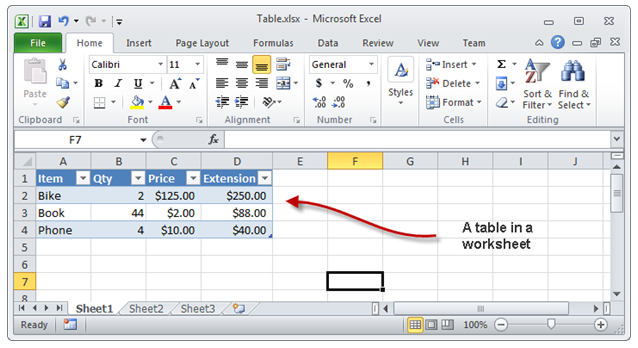
I’ve written a blog post and recorded a screen-cast around table markup in SpreadsheetML.  It is pretty easy to create a worksheet, populate cells in the worksheet, and then convert the cells to a table.  Tables in Excel 2010, as you probably know, look like this:

image

Here is the screen-cast that explains table markup, and walks through creation of a small Open XML SDK program that converts ordinary SpreadsheetML cells into a table:

Explores table markup, and walks through creating an Open XML SDK program to convert cells into a table.

Comments (8)

Consuming External OData Feeds with SharePoint BCS

I wrote an MSDN Magazine article, Consuming External OData Feeds with SharePoint BCS, which was published in April, 2011.  Using BCS, you can connect up to SQL databases and web services without writing any code, but if you have more exotic data sources, you can write C# code that can grab the data from anywhere you can get it.  Knowing how to write an assembly connector is an important skill for pro developers who need to work with BCS.  This article shows how to write a .NET Assembly Connector for BCS.  It uses as its data source an OData feed.  Of course, as you probably know, SharePoint 2010 out-of-the-box exposes lists as OData feeds.  The MSDN article does a neat trick – you write a .NET assembly connector that consumes an OData feed for a list that is on the same site.  While this, by itself, is not very useful, it means that it is super easy to walk through the process of writing a .NET assembly connector.

I write the article and the code for the 2010 Information Worker Demonstration and Evaluation Virtual Machine (RTM).  Some time ago, I wrote a blog post, How to Install and Activate the IW Demo/Evaluation Hyper-V Machine.

The MSDN article contains detailed instructions on how to create a read-only external content type that consumes an OData feed.  This is an interesting exercise, but advanced developers will want to create .NET assembly connectors that can create/read/update/delete records.  The procedures for doing all of that were too long for the MSDN magazine article, so of necessity, the article is limited to creating a read-only ECT.

However, I have recorded a screen-cast that walks through the entire process of creating a CRUD capable ECT.  It is 25 minutes long, so some day when you feel patient, you can follow along step-by-step-by-step, creating a CRUD capable ECT that consumes an OData feed.  Here is the video:

Walks through the process of creating an ,NET connector for an ECT that consumes an OData feed.

The procedure requires code for two source code modules: Customer.cs, and CustomerService.cs.

Here is the code for Customer.cs:


using System;
using System.Collections.Generic;
using System.Linq;
using System.Text;

namespace Contoso.Crm
{
    public partial class Customer
    {
        public string CustomerID { get; set; }
        public string CustomerName { get; set; }
        public int Age { get; set; }
    }
}

Here is the code for CustomerService.cs:


using System;
using System.Collections.Generic;
using System.Linq;
using System.Net;
using System.Text;

namespace Contoso.Crm
{
    public class CustomerService
    {
        public static Customer ReadCustomer(string customerID)
        {
            TeamSiteDataContext dc =
                new TeamSiteDataContext(
                    new Uri("http://intranet.contoso.com/_vti_bin/listdata.svc"));
            dc.Credentials = CredentialCache.DefaultNetworkCredentials;
            var customers =
                from c in dc.Customers
                where c.CustomerID == customerID
                select new Customer()
                {
                    CustomerID = c.CustomerID,
                    CustomerName = c.CustomerName,
                    Age = (int)c.Age,
                };
            return customers.FirstOrDefault();
        }

        public static IEnumerable<Customer> ReadCustomerList()
        {
            TeamSiteDataContext dc =
                new TeamSiteDataContext(
                    new Uri("http://intranet.contoso.com/_vti_bin/listdata.svc"));
            dc.Credentials = CredentialCache.DefaultNetworkCredentials;
            var customers =
                from c in dc.Customers
                select new Customer()
                {
                    CustomerID = c.CustomerID,
                    CustomerName = c.CustomerName,
                    Age = (int)c.Age,
                };
            return customers;
        }

        public static void UpdateCustomer(Customer customer)
        {
            TeamSiteDataContext dc =
                new TeamSiteDataContext(
                    new Uri("http://intranet.contoso.com/_vti_bin/listdata.svc"));
            dc.Credentials = CredentialCache.DefaultNetworkCredentials;
            var query =
                from c in dc.Customers
                where c.CustomerID == customer.CustomerID
                select new Customer()
                {
                    CustomerID = c.CustomerID,
                    CustomerName = c.CustomerName,
                    Age = (int)c.Age,
                };
            var customerToUpdate = query.FirstOrDefault();
            customerToUpdate.CustomerName = customer.CustomerName;
            customerToUpdate.Age = customer.Age;
            dc.UpdateObject(customerToUpdate);
            dc.SaveChanges();
        }

        public static void DeleteCustomer(string customerID)
        {
            TeamSiteDataContext dc =
                new TeamSiteDataContext(
                    new Uri("http://intranet.contoso.com/_vti_bin/listdata.svc"));
            dc.Credentials = CredentialCache.DefaultNetworkCredentials;
            var query =
                from c in dc.Customers
                where c.CustomerID == customerID
                select new Customer()
                {
                    CustomerID = c.CustomerID,
                    CustomerName = c.CustomerName,
                    Age = (int)c.Age,
                };
            var customerToDelete = query.FirstOrDefault();
            dc.DeleteObject(customerToDelete);
            dc.SaveChanges();

        }

        public static void CreateCustomer(Customer customer,
            out Customer returnedCustomer)
        {
            // create item
            TeamSiteDataContext dc =
                new TeamSiteDataContext(
                    new Uri("http://intranet.contoso.com/_vti_bin/listdata.svc"));
            dc.Credentials = CredentialCache.DefaultNetworkCredentials;
            CustomersItem newCustomer = new CustomersItem();
            newCustomer.CustomerID = customer.CustomerID;
            newCustomer.CustomerName = customer.CustomerName;
            newCustomer.Age = customer.Age;
            dc.AddToCustomers(newCustomer);
            dc.SaveChanges();
            returnedCustomer = customer;
        }
    }
}
Comments (4)

Search and Replace Text in an Open XML WordprocessingML Document

Searching and replacing text in an Open XML WordprocessingML document is not awfully difficult, but there are a few issues that complicate the process.  The text that you are searching for may span multiple runs, so the algorithm that searches for text needs to take this into account.  The replacement text should have the character formatting of the first character of the string in the document that matches the search string.  I’ve written a blog post at OpenXMLDeveloper.org that presents the algorithm, as well as example code written using XmlDocument (Microsoft’s implementation of XML DOM).  In addition, I’ve recorded a screen cast that explains the algorithm:

Walks through an algorithm to search and replace text in an Open XML WordprocessingML document.

Comments (24)

« Previous Page« Previous entries « Previous Page · Next Page » Next entries »Next Page »